
Reverse Sales Tax Calculator — Advanced
Calculate pre-tax (base) price from a tax-inclusive amount, support multiple tax rates, compound taxes, rounding rules, and downloadable breakdowns.
- Reverse tax calculation divides the tax-inclusive total to find the untaxed base.
- For additive taxes: totalTax = sum of (base * rate)
- For compound taxes: taxes apply sequentially, producing a higher total tax.
Understanding how to calculate the pre-tax price from a tax-inclusive total can be confusing, especially when different regions use multiple tax layers such as sales tax, VAT, GST, service tax, local tax, or even compound taxes. The Reverse Sales Tax Calculator on anycalctool.com helps you instantly determine the original price before tax, the total tax amount, and a complete line-by-line breakdown.
This advanced online tool is designed for business owners, accountants, freelancers, online sellers, and everyday shoppers who need fast, accurate, and transparent tax reversal calculations.
What Is a Reverse Sales Tax Calculator?
A reverse sales tax calculator is a tool that converts a tax-included amount back into the tax-excluded (base) price. Instead of adding tax on top of a price, it does the opposite—it removes the tax portion from a total.
This is helpful if you only know the final price, but want to find:
- The original cost before tax
- How much tax was charged
- A complete tax breakdown
- Differences between additive vs. compound tax systems
Why You Need a Reverse Tax Tool
Many businesses and consumers struggle with:
- Listings that show only final prices
- Confusion between different tax systems
- Complex multi-rate tax structures
- Manually calculating back-tax using formulas
- Determining profit margins and tax liabilities
Our advanced calculator solves these problems with:
- Multi-tax support
- Additive or compound calculation modes
- Fixed tax and percentage tax options
- Rounding rules
- CSV export, copy breakdown, and print/PDF
It is built for real-world scenarios, not basic one-rate math.
How the Reverse Sales Tax Formula Works
1. Additive (Parallel) Tax System
Used in most VAT/GST/Sales tax regions.
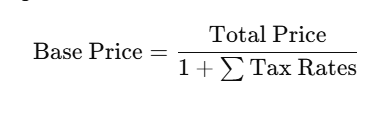
Example:
If total is $120 and tax is 20%:
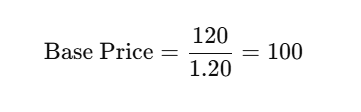
Tax = 20.
2. Compound Tax System
Used where one tax is applied on top of another.
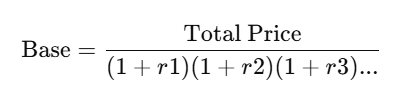
Example:
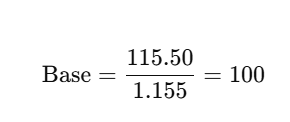
Tax1 = 10%, Tax2 = 5% applied after Tax1:
Total multiplier = 1.10 × 1.05 = 1.155
If total is 115.50:
3. Fixed Tax Amounts
These are subtracted before calculating the percent-based taxes.
Features of Our Advanced Reverse Sales Tax Calculator
✔ Multi-Rate Tax Support
Add unlimited tax types: VAT, GST, PST, HST, service taxes, environmental fees, fixed charges, etc.
✔ Additive or Compound Mode
Choose the tax system based on your region.
✔ Percentage or Fixed Taxes
Calculate backward price even if a flat fee is added.
✔ Rounding Options
Round to:
- nearest cent
- nearest 0.05
- round up
- round down
- no rounding (precise)
✔ Currency Field
Display results in any currency code (USD, AED, INR, EUR, etc).
✔ Tax Breakdown Export
Download full calculation as:
- CSV file
- clipboard text
- print/PDF
✔ Mobile-friendly UI
Fast, intuitive design that loads instantly on WordPress websites.
How to Use the Reverse Sales Tax Calculator
Follow these simple steps:
Step 1 — Enter the final price
This is the tax-inclusive total shown on:
- receipts
- invoices
- product listings
- online orders
Step 2 — Add tax rates
Add one or multiple taxes:
- 5% state tax
- 10% VAT
- 2% municipal tax
- $2 fixed environmental fee
You can also use preset quick-add buttons.
Step 3 — Choose calculation type
- Additive (most common for VAT/GST)
- Compound (when taxes stack on top of previous taxes)
Step 4 — Select rounding mode
Useful when working with cash invoices or accounting rules.
Step 5 — Click “Calculate Base Price”
The tool displays:
- Base price
- Total tax
- Individual tax amounts
- Full breakdown
- Export options
Who Should Use This Calculator?
For Business Owners
Determine your actual revenue before tax.
For Accountants & Bookkeepers
Reconcile receipts and find accurate pre-tax values.
For eCommerce Sellers
Understand platform fees and included taxes.
For Shoppers
See how much tax you paid on a purchase.
For Developers
Use the logic to calculate reverse taxes in apps or POS systems.
Benefits of Using a Reverse Tax Calculator
- Saves time compared to manual formulas
- Eliminates the risk of calculation errors
- Works with all countries and tax systems
- Provides transparent breakdowns helpful for audits
- Helps determine profit margins more accurately
Common Tax Rates by Country (Helpful Reference)
| Country | Common Sales/VAT Tax Rates |
|---|---|
| USA | 4%–11% (state & local taxes) |
| UK | 20% VAT |
| UAE | 5% VAT |
| India | 5%, 12%, 18%, 28% GST |
| Canada | GST 5%, HST 13–15% |
| Australia | 10% GST |
| EU Countries | 17%–27% VAT |
This tool supports all of them.
Frequently Asked Questions
What is the easiest way to calculate price before tax?
Use the calculator above and enter the total amount. It automatically computes the base price using the correct formula.
Does this tool support multiple taxes?
Yes, you can add unlimited percentage or fixed taxes.
Can I export the tax breakdown?
Yes, results can be exported as CSV, text, or printed as PDF.
Does this work for VAT and GST?
Absolutely. Additive mode is ideal for VAT/GST-based systems.
What if the total includes compound taxes?
Switch the calculator to “Compound Mode” for accurate results.
Is this tool free?
Yes. The Reverse Sales Tax Calculator is 100% free to use.
Conclusion
The Reverse Sales Tax Calculator on anycalctool.com gives you a fast, accurate, and transparent way to determine pre-tax amounts from any tax-inclusive total. Whether you’re a business owner analyzing revenue, an accountant verifying invoices, or a customer wanting to know how much tax you actually paid, this tool provides advanced tax reversal capabilities with an easy, intuitive interface.